Buying Crypto with Fiat Got Easier — Welcome Buy Crypto Feature
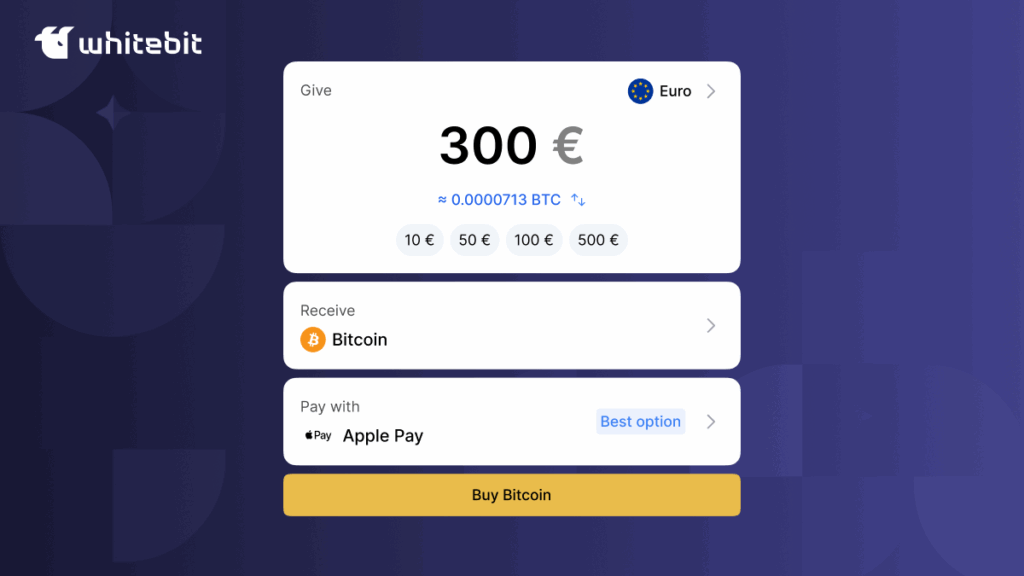
Our exchange tools are constantly evolving to make your interaction with digital assets even more convenient. We’re excited to introduce a new, incredibly simple way to buy cryptocurrency—Buy Crypto.
This section allows you to quickly buy crypto with your national currency, sell it at the current rate, or exchange it with a 10-second rate lock (via the Convertoption). Today, let’s examine the new buying functionality.

Experience the simplicity of Buy Crypto today
Key Benefits of Buy Crypto
Buy Crypto is the easiest and most convenient way to purchase cryptocurrency—just like buying something at your local store. No middlemen, no complicated processes, and no delays. Just you, your card, and your digital assets.
Here’s what Buy Crypto lets you do:
- Purchase any digital asset available on the exchange using Apple Pay or Google Pay.
- Instantly see the crypto equivalent after entering the fiat amount.
- Link multiple accounts to your selected payment method.
- Use a one-time card payment without saving your card details.
- Instantly receive the purchased crypto to your Main balance.
How to Buy Crypto in the App?
In the mobile app, the section is located at the center of the main menu under the “Buy” button. The section includes three categories: Buy, Sell, and Convert.
To buy crypto:
- Select the “Buy” category.
- Choose the fiat currency you’re using and the cryptocurrency you want to receive.
- Enter the desired amount—you’ll instantly see the crypto equivalent.
- Choose your payment method—Apple Pay/Google Pay, card details, ZEN Pay (EUR/PLN), or “Quick top-up” for Ukrainian hryvnia.
- Click “Buy” and agree to the terms of use.
- Confirm the transaction in the new window and wait for it to be processed.
That’s it—your crypto will appear on your Main balance. Yes, it’s really that simple.
How to Buy Crypto on the Web?
Now, you can buy cryptocurrency directly from the main page. Simply click on the “Buy Crypto” section in the top bar, located to the right of the “Products” tab. The process is the same as in the app, making it quick and easy:
- Choose the fiat currency you’re using and the cryptocurrency you want to receive.
- Enter the desired amount and instantly see the crypto equivalent.
- Choose your payment method — Apple Pay / Google Pay, or card details.
- Click “Buy” and agree to the terms of use.
- Confirm the transaction in the new window and wait for it to be processed.
- Leave feedback to help us improve the service.
The funds will be credited to your Main balance within minutes of the transaction being processed.
Even More Features Now Available
Don’t forget—in the Buy Crypto section, you can also use Convert with a 10-second rate lock. However, in the web version, purchasing and exchanging are located in different menu sections.
Buying digital assets has truly become an everyday task. So why not try it out right now?
Buy Crypto in seconds with a new feature